AI Image Combiner: How It Works and How to Use One
An AI image combiner merges two photos into one frame rather than placing them side by side. Here is what that means in practice, the five things that separate a convincing merge from an obvious one, and how to judge a tool before you pay.
An AI image combiner takes two or more photographs and returns a single new one. Not the two pictures placed next to each other, and not one cut out and pasted onto the other — one frame, in which the subject of the first photo genuinely looks like it was photographed in the second.
That distinction is the whole subject of this guide. It is also where most of the disappointment comes from: people arrive wanting a merged photograph and end up with a collage, or with a subject that has clearly been dropped in from somewhere else.
Below: what the software is really doing, how to combine images with AI step by step, the five things that give a bad merge away, and straight answers to the questions people ask before trusting a tool with their photos.
What an AI image combiner actually is
At its simplest: three inputs, one output.
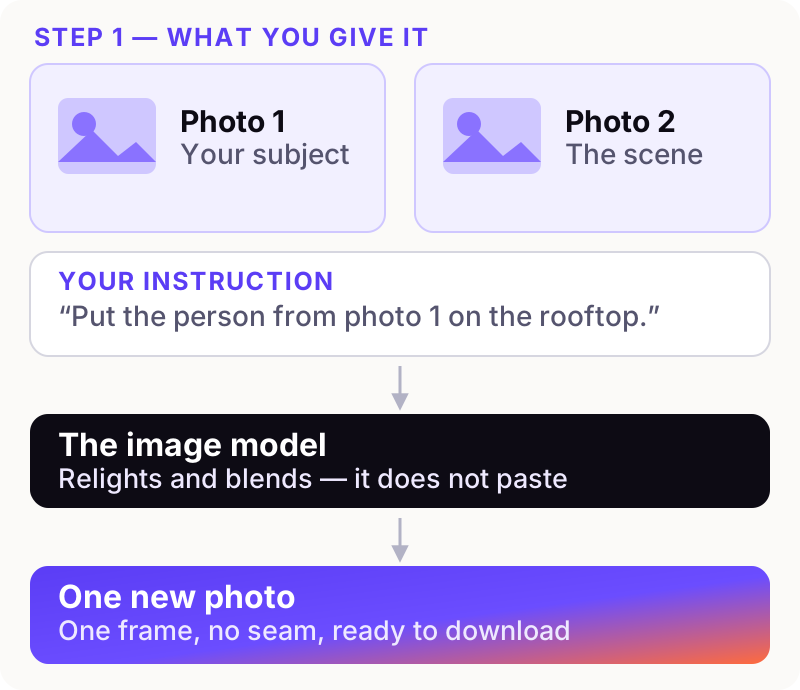
You supply a subject photo, a scene photo and a sentence describing what should happen. The model reads all three together and paints a new image. It is not compositing your pixels the way an editor would — it is generating a fresh photograph that keeps the things you asked it to keep.
Why it is not a collage maker
A collage tool arranges your photos in a grid. Every original pixel survives and the seams are the point — a legitimate thing to want, covered in how to put two images side by side. A combiner does the opposite: it destroys the seam, because the output is a single generated frame.
Why it is not a background remover either
Background removal cuts your subject out and drops it onto something else, keeping its original lighting. That is why those images look wrong — a person lit by an office window standing in a sunset.
A combiner relights. Move someone into warm evening light and their skin tone, the rim light on their hair and the direction of their shadow all change to match. When people say a merge "looks real", relighting is usually what they mean.
Why it is not an image stitcher
Stitching joins overlapping frames of one scene into a panorama. It aligns; it does not invent. If your photos show different things there is no overlap to align — image stitcher vs image combiner sets out which one a job needs.
How an AI image combiner works
You do not need the research paper, but knowing roughly what happens explains why some requests succeed and others fail.
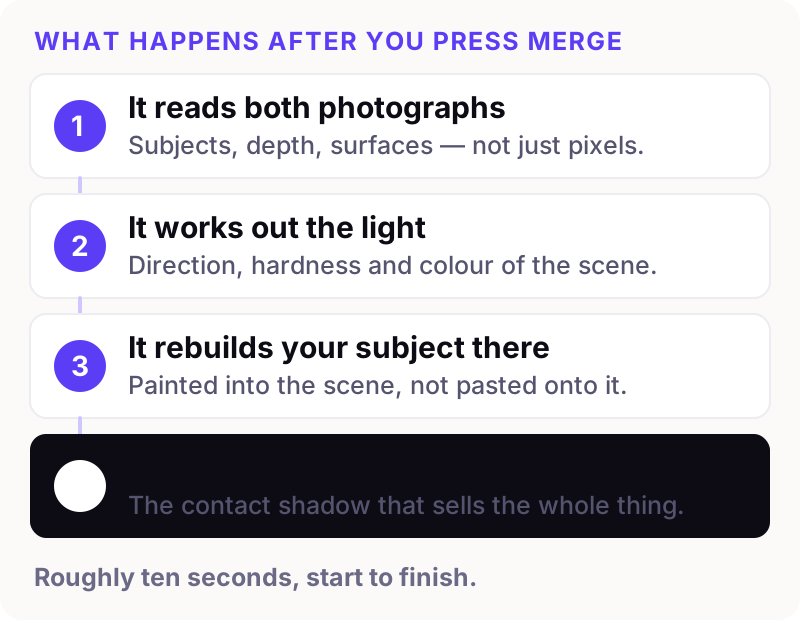
The model is not finding your subject's outline and cutting along it. It is generating a new picture, conditioned on your photos and your words — which is why it can put warm light on a face that never saw any, and why it will not reproduce an exact hex value on demand. Nano Banana, explained covers the model behind most good tools in plain language.
What it looks like in practice
Here are two ordinary photos and the single image made from them. The portrait was shot against a plain grey wall; the scene is a rooftop at golden hour.
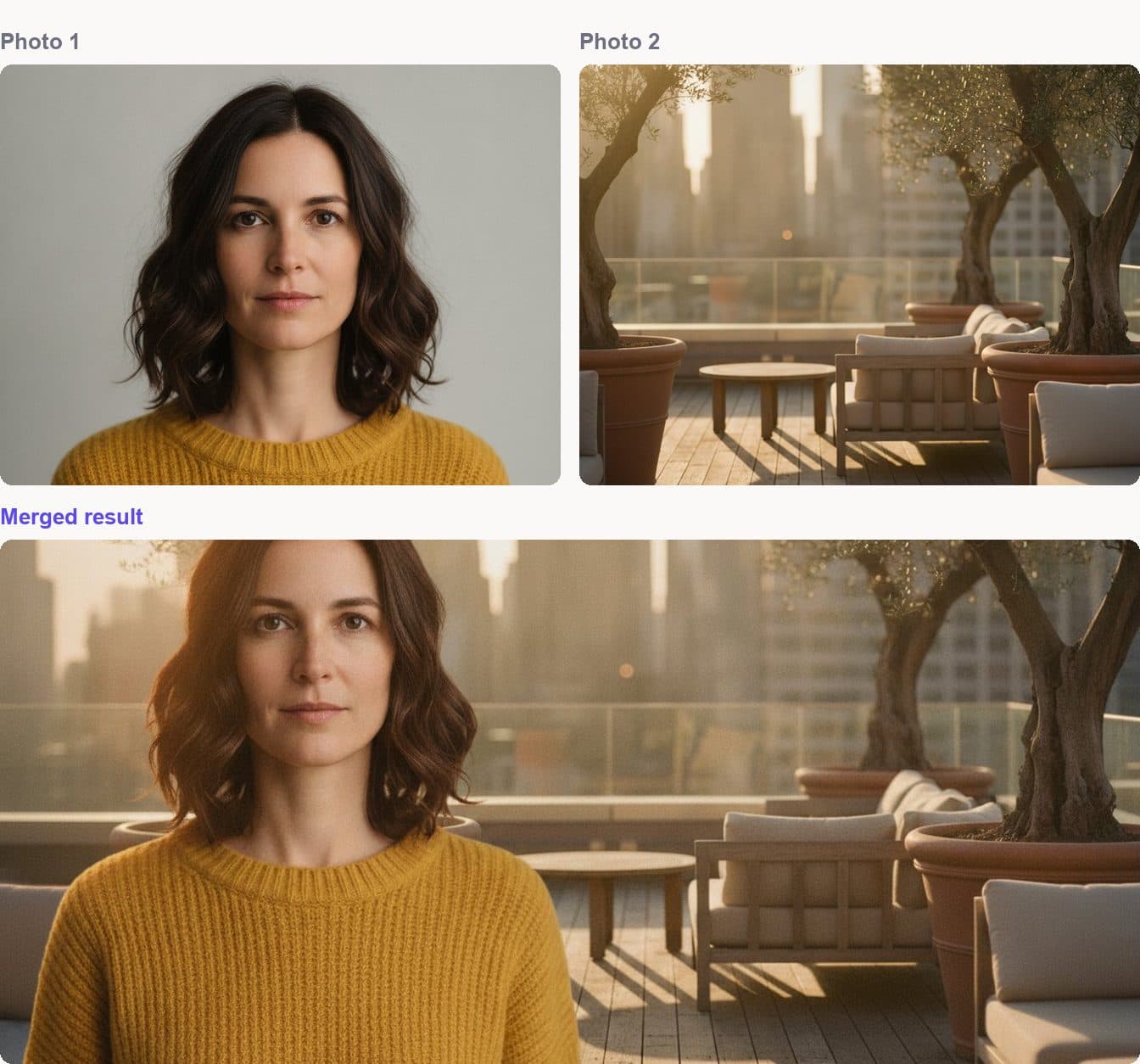
Look at what moved. Her face and clothing are unchanged — the part you never want touched. The flat studio light is gone, replaced by the warm directional light of the scene, and there is a shadow on the decking that agrees with the sun behind her. Nothing in the source photo had that shadow; the model added it because a person standing there would cast one.
How to combine images using AI, step by step
1. Choose which photo is the subject and which is the scene
One image supplies the thing you want to keep; the other supplies the world it goes into. Decide before you upload, because your instruction refers to them by position.
When you are working from a mixture of pictures taken on different days or different cameras, light direction decides most of the outcome. Two photos lit from similar sides merge almost effortlessly; a flash portrait going into overcast daylight is the hardest thing you can ask. Our how it works page covers the ordering that makes this easiest to control.
2. Upload the originals, subject first
Use the original files — not screenshots, not the copies that arrived by message. Those are already compressed and the combiner reproduces that faithfully. The first image sets the lighting and camera angle the result follows.
3. Write one specific sentence
A good instruction does four jobs: names the subject, says where it goes, describes the light, and protects what must not change.
The woman in the yellow jumper from photo 1, standing on the rooftop deck, lit by the low evening sun with a contact shadow on the decking. Keep her face and clothing exactly unchanged.
Words that earn their place describe the picture: preserve, unchanged, contact shadow, behind, left of frame, warm evening light. Words that do not: beautiful, stunning, high quality, 8k. Those describe how you feel about the output, and the model already knows you do not want an ugly picture. Writing prompts for image merging goes deeper.
4. Set the output shape before you generate
Decide where the image is going. A wide frame cropped to a square afterwards loses a third of the composition, usually the third you cared about.
5. Review it at full size
Check the five things below. On a phone, pinch in — a small screen flatters everything.
How to tell a good result from a bad one
You do not need a trained eye. You need five specific things to look at, and they are the same five every time.
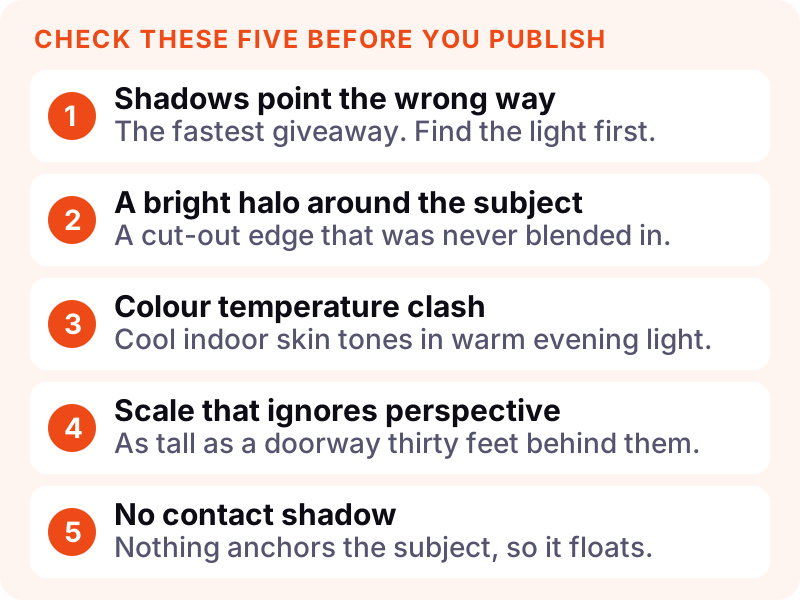
Shadow direction is the fastest tell. Find the light in the background, then check every shadow runs away from it. One pointing the wrong way undoes everything else.
The halo is a pale fringe around the subject, left where an edge was cut rather than blended. Zoom to 100% around hair and shoulders.
Colour temperature should be consistent — cool skin in warm light reads as a sticker.
Scale has to respect perspective. A person thirty feet back cannot be as tall as the doorway beside them.
A contact shadow is the dark patch where a subject meets the ground. Without it they float, and it is the detail most tools skip.
What people actually use one for
The requests that come through our tools pages fall into a handful of patterns:
- Two people in one photo. Somebody was missing on the day. The most common request by a wide margin.
- Changing the background. A good portrait ruined by a cluttered room — swapping the background keeps one and loses the other.
- A product in a real scene. A packshot that needs to look like it is on a kitchen counter; our product compositing checklist covers that case properly.
- Old photographs, repaired and combined. Two damaged prints, one clean copy.
- Interiors and staging. Real furniture in a real empty room, before anyone buys it.
How to judge a tool before you pay for one
Most combiners look identical on their home page. Four questions separate them:
- Can you see the setup before you commit? You should be able to load photos, arrange them and write the instruction before paying. That is how bestimagecombiner.com works — an account and credits are needed only for the generation itself.
- Can you control the output shape? Being locked to square is a real constraint for a website header.
- What happens to your uploads? It matters more than people assume with family photos — see what happens to uploaded photos.
- Is the pricing honest? Credits that expire quietly are a common trap. Ours are on the pricing page, with no trial that converts into something you did not agree to.
What no combiner can do yet
Being straight about the limits saves you time:
- Hands in complicated poses still go wrong often enough to check every time.
- Small text does not survive. A logo usually holds; a paragraph of ingredients will not.
- Exact counting and precise geometry both drift — ask for seven objects and you may get six.
- Detail that was never captured. A face forty pixels wide will not come back sharp.
Frequently asked questions
What is an AI image combiner?
An AI image combiner is a tool that merges two or more photographs into a single new image, rather than placing them side by side. It reads your photos and a written instruction, then generates one frame in which the subject of one photo appears naturally within the scene of another, relit to match.
How do I combine two images with AI?
Upload the subject photo first and the scene photo second, write one sentence saying what should happen to which, set the output shape, and generate. The sentence should name the subject, say where it goes, describe the light, and state what must not change.
Is an AI image combiner free?
Tools that are genuinely free usually watermark the result, cap resolution, or keep rights over your uploads. We charge for generation and say so up front: set everything up without an account, pay only when you produce an image.
What file types and sizes work best?
JPG, PNG and WebP up to 12 MB each. Use the original file rather than a screenshot or a messaging-app copy — compression artefacts are reproduced faithfully and soften the result.
How many photos can I combine at once?
Up to four. More inputs give the model more to reconcile, so two or three usually produce the cleanest result unless you genuinely need the extra elements.
Will it change my face?
Only if you let it. Add an explicit instruction — "keep her face exactly unchanged" — and the model preserves it. Identity drift is the single most common complaint and almost always traces back to an instruction that never asked for preservation.
Is it the same as Photoshop?
No, and they are good at different things. A combiner is faster and handles hair and soft edges well; a manual editor gives exact control and perfect repeatability. AI image combiner vs Photoshop compares them honestly, including where the AI route loses.
Can I use the results commercially?
Yes, for work you own the inputs to. The responsibility that stays with you is the same as with any photograph: do not composite people who have not agreed to it, and do not present a generated image as documentary evidence.
Start with your own two photos
The fastest way to understand any of this is to run one merge and check it against the five tells above. Load your images, arrange them and write your instruction at bestimagecombiner.com — no account needed to set it up, and nothing is generated until you say so.
For more detail first, how to AI combine two images walks the process end to end with a worked example.